Features Built for Serious Traders
Everything you need to research, test, and execute trading strategies with confidence.
CandleSight is strategy research infrastructure—a desktop application that lets you build trading strategies visually, backtest them against years of historical data, and analyze your results with AI. No MQL, no Pine Script, no Python required.
Trading Agent
Every tier includes a Trading Agent powered by Claude that helps you complete workflows faster. Ask it to build strategies, analyze trades, or explain what's happening in the market.
Try the Trading Agent with limited queries. Enough to see how it works and get help building your first strategy.
Monthly token allocation for regular AI usage. Build strategies with natural language, get trade insights, and analyze backtests.
Larger token allocation for power users. Full access to market context analysis, pattern recognition, and AI data exploration.
Supported Indicators
Build strategies using popular technical indicators. Set conditions like "RSI crosses below 30" or "Price closes above 50 EMA" and combine them with AND/OR logic.
Momentum
- RSI
- MACD
- Stochastic
- DSS (Double Smoothed)
Trend
- SMA / EMA
- ADX (+DI / -DI)
- Ichimoku Cloud
- MA Histogram
Volatility
- Bollinger Bands
- ATR
- Chandelier Exit
- MA Bands
Price Action
- Swing High/Low
- Daily High/Low/Range
- ADR (Avg Daily Range)
Free
$0/monthYour trading journal, elevated. Everything you need to track trades and build strategies.
Account Sync
Your trades sync automatically from OANDA with real-time updates
Connect your OANDA account and watch your trades appear instantly. Real-time streaming keeps everything up to date as you trade.
Trade History
Complete record of all your trades with P&L, dates, and prices
Access your full trading history with detailed information on every trade including entry/exit prices, duration, and realized P&L.
Open Positions
Monitor your current positions with live P&L updates
Pending Orders
Track limit and stop orders waiting to execute
Trading Notes
Annotate trades and strategies with notes and lessons learned
Document your thinking on each trade and strategy. Build a personal trading journal that helps you learn from both wins and losses. Save AI analysis insights directly to notes for future reference.
FX Ticket
Full-featured order entry with stop loss and take profit
Interactive Charting
TradingView-powered charts with multiple timeframes and indicators
Analyze markets with professional-grade charts. Add technical indicators, draw support/resistance zones, and view multiple timeframes.
Strategy Builder
Build rule-based strategies with indicators and entry/exit conditions
Create systematic trading strategies using technical indicators. Define precise entry and exit rules, then test them against historical data.
Backtest Execution
Test your strategies against historical data before risking capital
Run your strategies against years of historical price data. Configure timeframes, instruments, and initial balance.
Basic Backtest Results
See total P&L and trade count from your backtests
Local-First Security
Your API keys are encrypted on your device and never leave your computer
Zero-knowledge architecture means we never see your credentials. AES-256 encryption with Argon2id key derivation keeps your data safe.
MCP Raw Data Access
Query trades, strategies, notes, and S/R zones through AI assistants via MCP
Connect CandleSight to Claude Desktop or other MCP-compatible AI assistants. Query your trade history, strategies, trade notes, strategy notes, and support/resistance zones. Create and update notes through natural conversation.
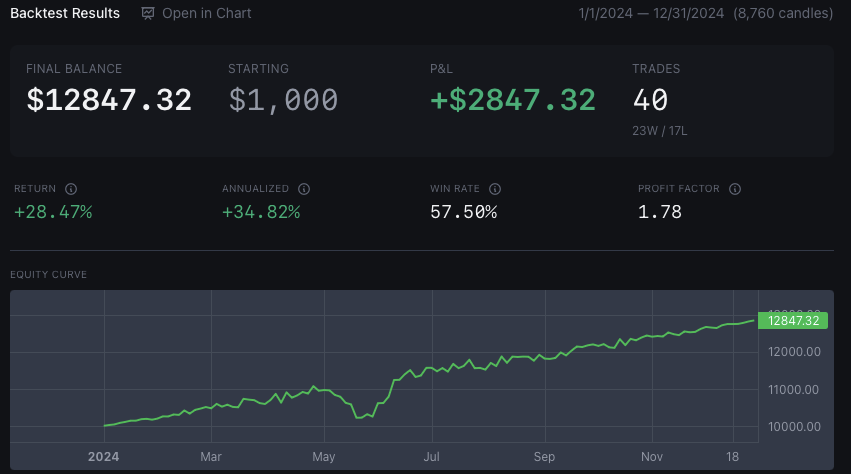
Backtest your strategies against years of historical data
Backtesting Methodology
CandleSight runs your strategy against 10+ years of historical forex data to show you exactly how it would have performed. Every backtest includes these key metrics:
Equity Curve
Visual representation of how your account balance would have changed over time. Spot drawdowns, recovery periods, and growth phases at a glance.
Win Rate
Percentage of trades that were profitable. Important context: a 40% win rate can still be profitable with the right risk/reward ratio.
Profit Factor
Gross profit divided by gross loss. A profit factor above 1.0 means the strategy is profitable overall. Above 1.5 is considered strong.
Maximum Drawdown
The largest peak-to-trough decline in account value. Critical for understanding how much pain you'd need to endure during losing streaks.
Sharpe Ratio
Risk-adjusted return measuring excess return per unit of volatility. Higher is better—above 1.0 is good, above 2.0 is excellent.
Trade Analysis
Every simulated trade is recorded with entry, exit, P&L, and duration. Filter by instrument, direction, or time period to find patterns.
Premium
$24.99/monthor $250/year (save 17%)Full analysis suite. Understand your edge with detailed trade insights and live strategy monitoring.
Strategy JSON Import
PremiumImport strategies from JSON definitions
Script Conversion
PremiumConvert Pine Script, MQL4 & MQL5 strategies to CandleSight format
Bring your existing strategies from TradingView, MetaTrader 4, and MetaTrader 5. AI-powered conversion translates Pine Script, MQL4, and MQL5 into CandleSight strategy definitions so you can backtest and monitor them immediately.
Backtest on Chart
PremiumSee backtest trades visualized on the price chart
Advanced Trade Metrics
PremiumExpectancy, profit factor, risk/reward ratio, and average duration
Go beyond basic P&L with advanced performance metrics. Expectancy tells you expected profit per trade. Profit factor shows your edge. Risk/reward ratio and duration analysis help optimize your strategy.
Advanced Performance Breakdown
PremiumAnalyze performance by day, hour, instrument, direction, RSI zone, and trend
Go beyond session-based analysis. Break down your performance by day of week, hour of day, instrument, direction, RSI zone at entry, and trend alignment. Identify exactly when and where you trade best.
Advanced Patterns
PremiumStreak analysis, overtrading detection, time edges, and recovery patterns
Discover hidden patterns in your trading behavior. Track win/loss streaks, detect overtrading tendencies, find your best trading times, and understand how you recover after losses.
Trade Drill-Down
PremiumSee the individual trades behind any statistic
Click "See Trades" on any breakdown or pattern to view the underlying trades. Understand exactly which trades contribute to each metric.
Trade Insights
PremiumSee how price moved after your exit and key performance metrics
Understand what happened after you closed each trade. See if you left money on the table or got out at the right time.
Post-Exit Analysis
PremiumTrack how far price moved in your favor or against you after exit
Capture Efficiency
PremiumMAE, MFE, and capture efficiency metrics for every trade
Maximum Adverse Excursion (MAE) shows your worst drawdown. Maximum Favorable Excursion (MFE) shows the best price you could have gotten. Capture efficiency tells you how much of the move you actually captured.
Backtest Results Panel
PremiumFull statistics panel with P&L, win rate, Sharpe ratio, and drawdown
See detailed metrics from your backtests including profit factor, expectancy, Sharpe ratio, maximum drawdown, and more.
Economic Calendar
PremiumTrack high-impact economic events that move markets
Stay informed about upcoming economic releases. Filter by currency and impact level to focus on what matters for your trades.
Strategy Import/Export
PremiumExport strategies to share or backup, import from files
Live Monitor
PremiumMonitor markets for strategy signals in real-time with alerts
Set up watchers for your promoted strategies. Get notified when market conditions match your entry criteria.
Background Processes
PremiumKeep monitors running when all windows are closed
Minimize to system tray and continue receiving pattern match notifications even with no windows open. Perfect for monitoring multiple strategies throughout the trading day.
MCP Calendar Access
PremiumQuery economic calendar through AI assistants via MCP
MCP Strategy Mutations
PremiumCreate and update strategies through AI assistants via MCP
Trade Markers on Chart
PremiumSee your actual trade entries and exits overlaid on the price chart
S/R Zones on Chart
PremiumYour saved support/resistance zones automatically displayed on charts
Chart Indicators
PremiumPlot technical indicators like SMA, EMA, RSI, MACD, Bollinger Bands on charts
Overlay moving averages, momentum oscillators, and volatility indicators directly on your charts. Includes SMA, EMA, RSI, MACD, Stochastic, Bollinger Bands, ATR, Ichimoku, and Chandelier Exit.
Walk-Forward Analysis
PremiumRolling window optimization to validate strategy robustness
Optimize parameters on training windows and test on out-of-sample periods. See walk-forward efficiency, parameter stability, and true out-of-sample performance.
Anchored Walk-Forward
PremiumWalk-forward with expanding training window from fixed start
Like walk-forward, but the training window grows over time instead of rolling. Anchored from a fixed start date, capturing more history as you progress.
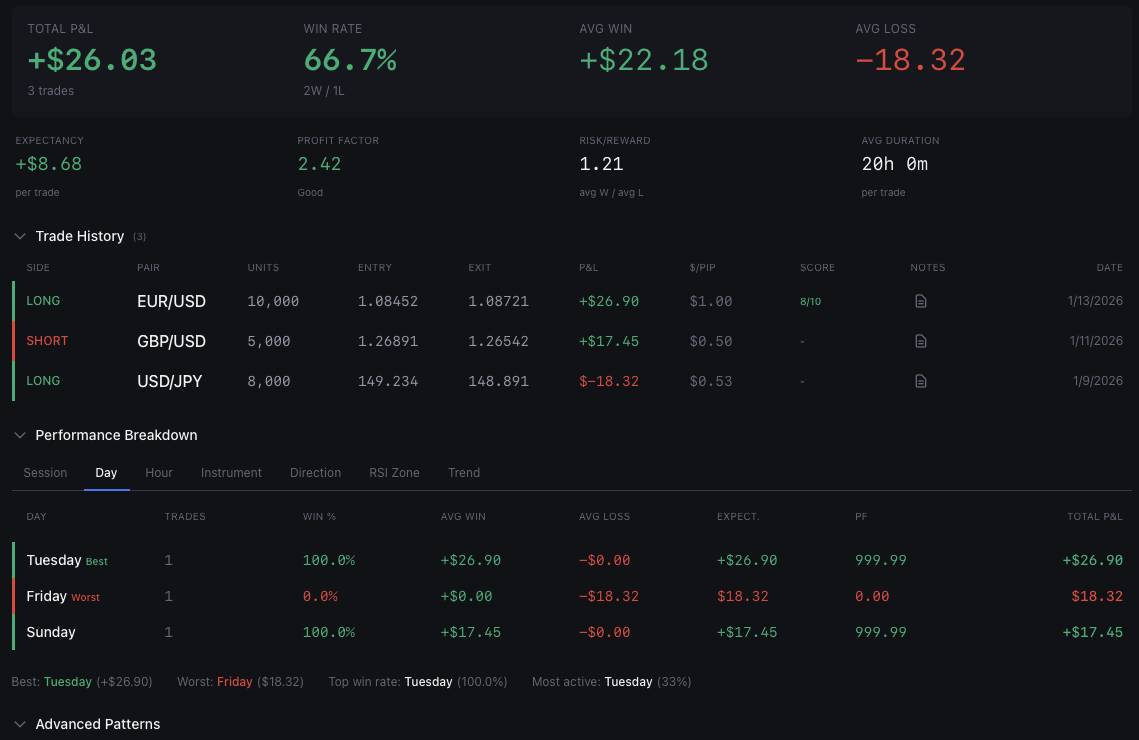
Analyze your trades with detailed performance breakdowns
Pro
$49.99/monthor $500/year (save 17%)AI-powered edge. Get Opus-level analysis with market context on every trade.
AI Trade Analysis
ProGet Claude-powered insights on individual trades
AI analyzes your trade with entry/exit scoring, indicator alignment, and educational takeaways. Understand what went right and wrong.
AI Backtest Analysis
ProAI-powered analysis of your backtest results
Get strategic insights on your backtest performance. AI identifies edge, weaknesses, and improvement opportunities.
AI Strategy Builder
ProCreate strategies using natural language descriptions
Describe what you want in plain English and the AI builds the strategy structure. Say "Add an EMA crossover entry" or "Exit when RSI goes above 70" - the AI translates your intent into working strategy rules.
Market Context
ProUnderstand what the market was doing when you entered and exited
AI provides context on session timing, volatility regime, nearby economic events, and cross-pair correlations at trade time. This is the 'secret sauce' that makes our analysis valuable.
Pattern Recognition
ProAI identifies patterns across your trading history
MCP AI Analysis
ProRequest AI analysis through AI assistants via MCP
AI Subset Analysis
ProGet AI insights on any filtered group of trades
When viewing trades behind a statistic, ask AI to analyze that specific subset. Understand patterns, get recommendations, and identify what makes these trades different.
Trade Export
ProExport trades to CSV for external analysis
Export any filtered set of trades to CSV format. Perfect for sharing with coaches, importing into spreadsheets, or archiving your trading history.
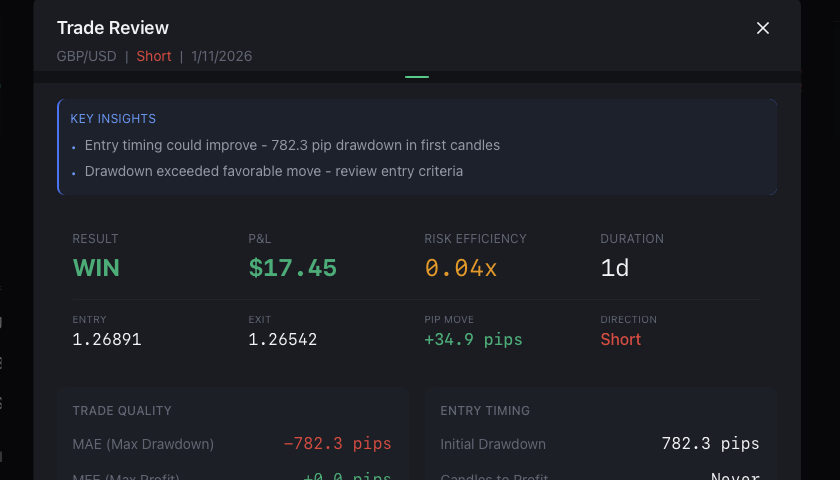
Review trades with AI-powered insights and key metrics
What Can the Trading Agent Do?
The Trading Agent is powered by Claude (Anthropic) and has direct access to your trading data. No copy-pasting or manual entry—just ask questions and get answers based on your actual trades.
"Build me a strategy that enters on RSI oversold with EMA confirmation"
"Why did my strategy underperform in March?"
"What patterns appear in my losing trades?"
"Compare my win rate on EUR/USD vs GBP/USD by session"
How tokens work: Each AI interaction uses tokens based on complexity. Simple questions use fewer tokens than deep analysis. Your monthly allocation refreshes each billing cycle, and you can always see your remaining balance in the app.